Payment &
Compliance
Automation
disbursal account
INR 20,00,000
Total amount
INR 40,00,000
Total employees
Pay Total Amount
PAYMENT AUTOMATION
Total amount
INR 40,00,000
Total employees
2000
Pay Total Amount
PAYMENT AUTOMATION
Total amount
INR 16,00,000
Total employees
3000
Pay Total Amount
SALARY PAYMENT
Total amount
INR 40,00,000
SALARY PAYMENT
Pay Total Amount
Total employees
2000
Total amount
INR 2,00,000
COMPLIANCE PAYMENT
Make Compliance payment
Total employees
250
Helped Keka provide payroll automation for small-midsize businesses
88%
success rate in beta release
90%
users said the experince is simple & easy
OVERVIEW
Problem Statement
After completing payroll calculations, the following steps of distributing salaries to employees and filing compliance were done manually, highlighting a lack of a fully integrated solution for the entire payroll process.
Manual Salary Disbursement
Manual Compliance filing
End to end solution missing
Market automation trend
Solution
Timeline
2 Months
Feature enhancement
Project Info
Primary UX Designer
UX Researcher
My Role
We introduced a user friendly way of transfering salaries and filing compliances. We created a wallet, enabling seemless fund transfer post payroll-finalization. With just a click, users can effortlessly disburse salaries and initiate compliance filings, all managed conveniently from the wallet.
Easy and reliable wallet
Transfer funds to your wallet anytime and use it to make payments. Its fast and secure.
disbursal account
INR 20,00,000
One Click Salary Transfer
Transfer funds to your wallet anytime and use it to make payments. Its fast and secure.
total amount
INR 20,05,000
total Employees
605
Pay total amount
Paid
Default batch
605 Employees
processing
Default batch
605 Employees
Smooth Compliance Filing & Payment
Transfer funds to your wallet anytime and use it to make payments. Its fast and secure.
TDS
PF
ESI
PT
Initiate by 7 Apr 23
4 Days left
pending
Review & pay
Paid on 8 Apr 23
Paid
Paid
RESEARCH
Competitive Analysis
We looked at similar softwares that provide payroll services along with automation. Among many payroll providers RazorpayX Payroll and ADP payroll emerged as direct competitors for small - mid size organisations payroll service providers.
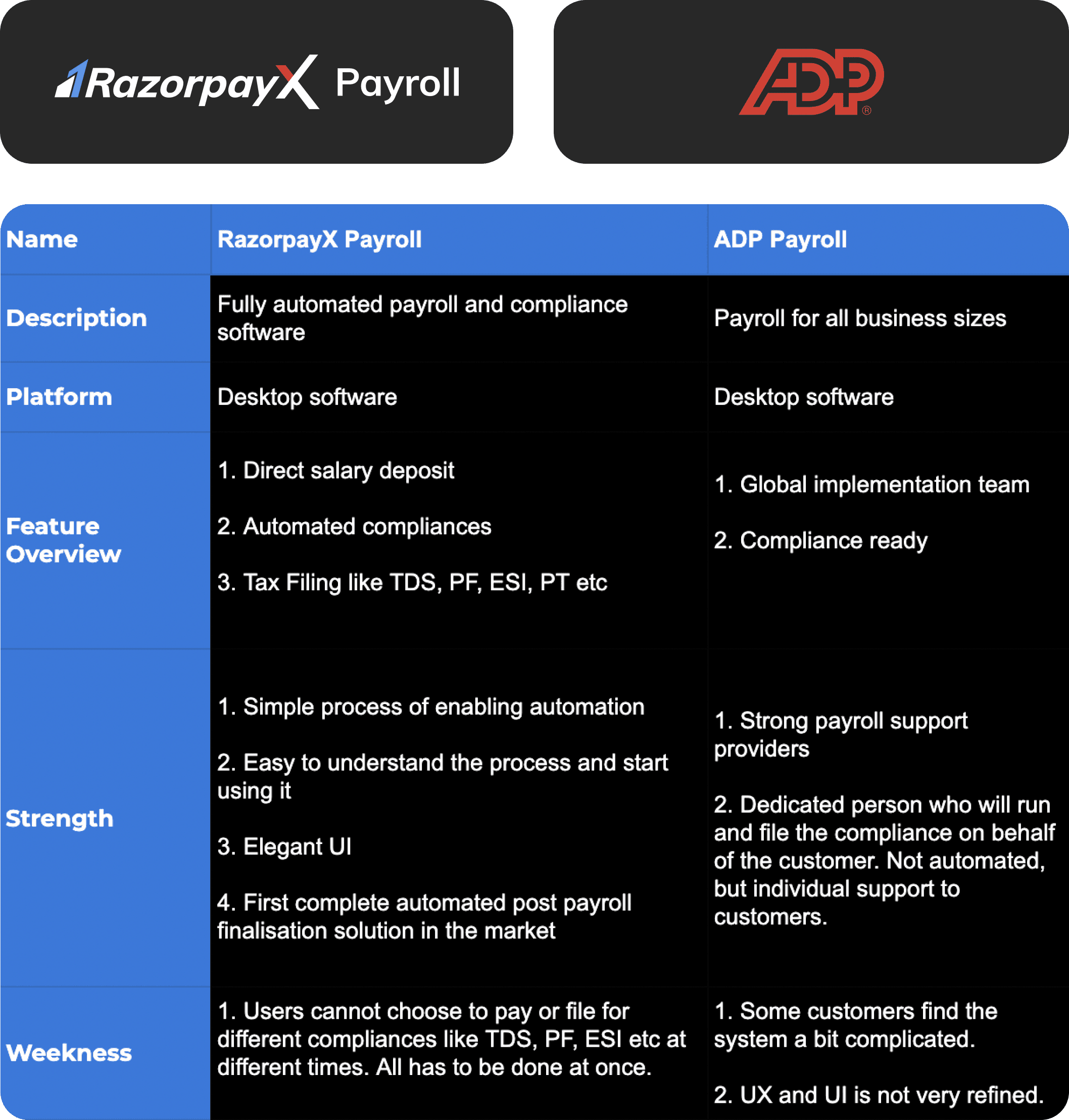
After analysing the strengths and weaknesses of our competitors we needed to filter out what we really want to improve and focus on.
Here are the areas we identified for improvement:
RazorpayX Payroll has a major disadvantage of not allowing users to file or pay for different compliance at different times. Also we heard from customers that Salary disbursal and Compliance payments happen at once which they have no control until they change the default setting.
Our competitors were providing easy setup which is really being appreciated. We aim to do the same by improving on the UX a bit more so new customers can be onboarded quickly and effectively.
Understanding customer needs
Following the finalization and calculation of payroll, the subsequent steps involving the disbursement of salaries to employees and the completion of compliance filings were entirely manual. This felt like a deficiency in delivering a comprehensive end-to-end solution for payroll calculation, salary distribution, and compliance filing processes.
Persona
We really wanted to create this solution keeping in mind the problems faced for salary disbursal and compliance filing in small to mid size businesses. Typically, in early-stage small startups, the CEO handles all responsibilities until a dedicated finance professional is onboarded. Similarly, at times, HR may take on the role of a finance person.

Ajay Kumar
32 years
“I am the CEO of a startup looking to
streamline the process of payroll
and get things done quickly”
Needs:
Need to disburse employees salary easily.
Want to file and pay for compliance within the deadline and remain compliant.
Frustrations:
Too much work now. Need to send transfer statement to bank and rely on their timings to transfer salaries. No control.
Filing compliance takes a lot of time and I don’t have time as I only want to focus on growing my business.

Shilpa Rao
28 years
“I am a HR manager in a small startup
responsible for looking after company
culture and finance”
Needs:
Want to disburse employees salary on time and accurately.
Don’t want to invest too much time on compliance filing and payment.
Frustrations:
Takes a lot work to disburse the salary to employees like reaching out to the bank every time.
Don’t have much knowledge in compliance filing, thus facing problems in filing various compliances.
DESIGN
This feature has multiple stages and touch points
User Onboarding
User initiates KYC
KYC Verification
CS verifies KYC
Salary Payment & Compliances
Compliance filing & salary disbursal
Ideation
I broke the feature down into manageable parts and brainstormed solutions for them. Some aspects had a route that was already defined, while for others, I explored various potential strategies.
After a lot of discussion and back and forth conversation we concluded on the scope and how we want to approach each part of the feature. For eg: we realised that we need to deploy both payment automation and compliance filing together (earlier due to timeline issues managers have planned separate deployment), therefore we will create a single onboarding flow for both.
Here are the core decisions made:
KYC will be needed for
user onboarding
Show due date for salary payment & compliances
Wallet to show account
balance
Feature banner in the product
Marketing video for feature
introduction
Two stage release of the
feature
Early stage design explorations
Once the requirement was finalised, just directly into white boarding a very high level version of how the final design might look like. Now its time to create something on figma and place the key elements on the screen so further design process can be made.
We had already created a simple solution in case KYC might not be needed for user onboarding but due to legal and compliance issues we had to incorporate KYC in the flow. This requirement changed the flow drastically.
Will be listing the iterations with KYC verification here. We can sure discuss on the flow when KYC was not needed if better design clarity is needed :)
Steps for automation setup
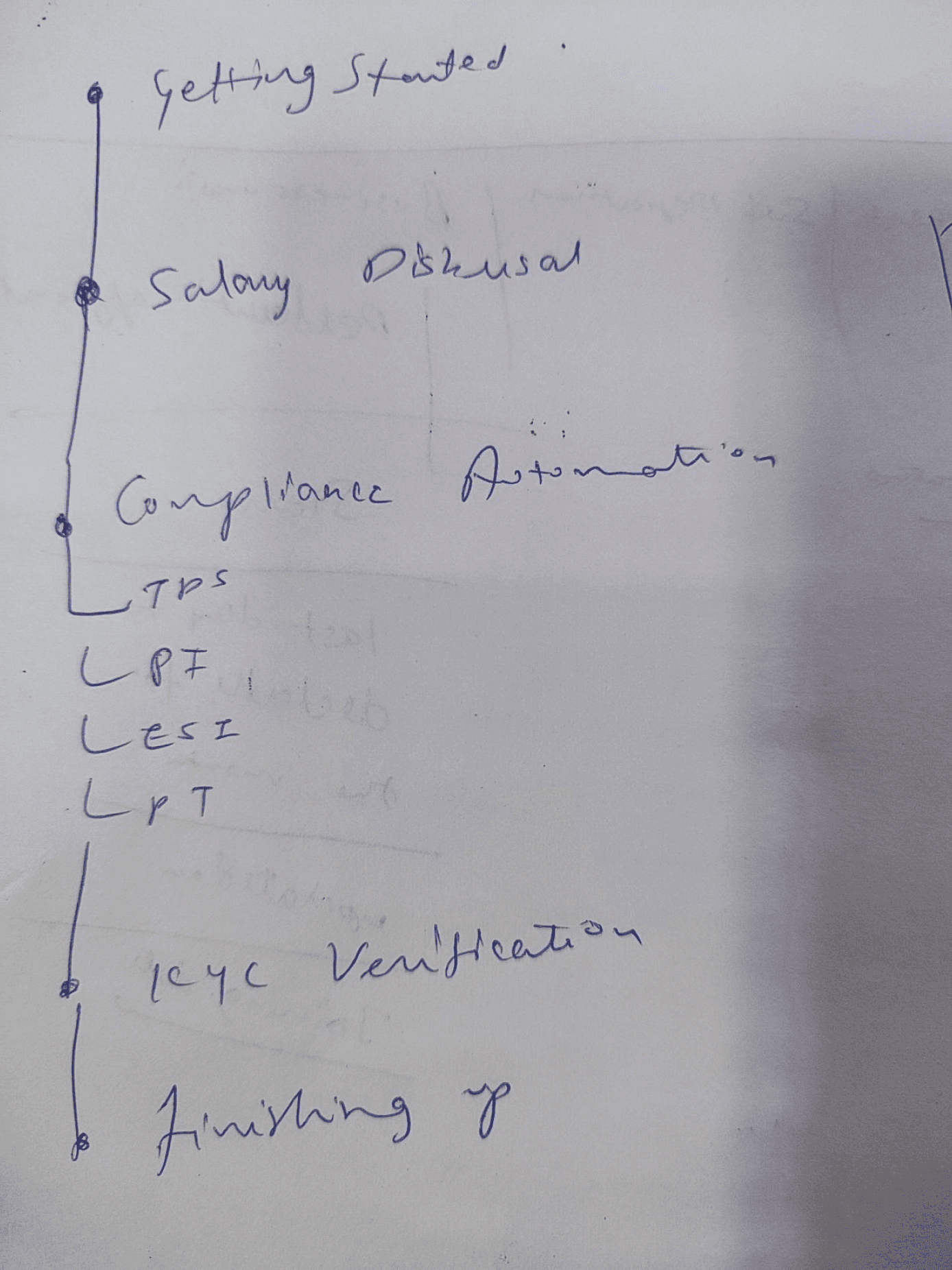
Iteration I
KYC verification is asked after Salary disbursal and Compliance automation steps. I thought of this because of two reasons:
Introducing the feature and the requirements as early as possible to the user
Not letting KYC Verification become a blocker
Iteration II
KYC verification is asked before Salary disbursal and Compliance automation steps and both these automations are combined under a section ‘Setup automation’.
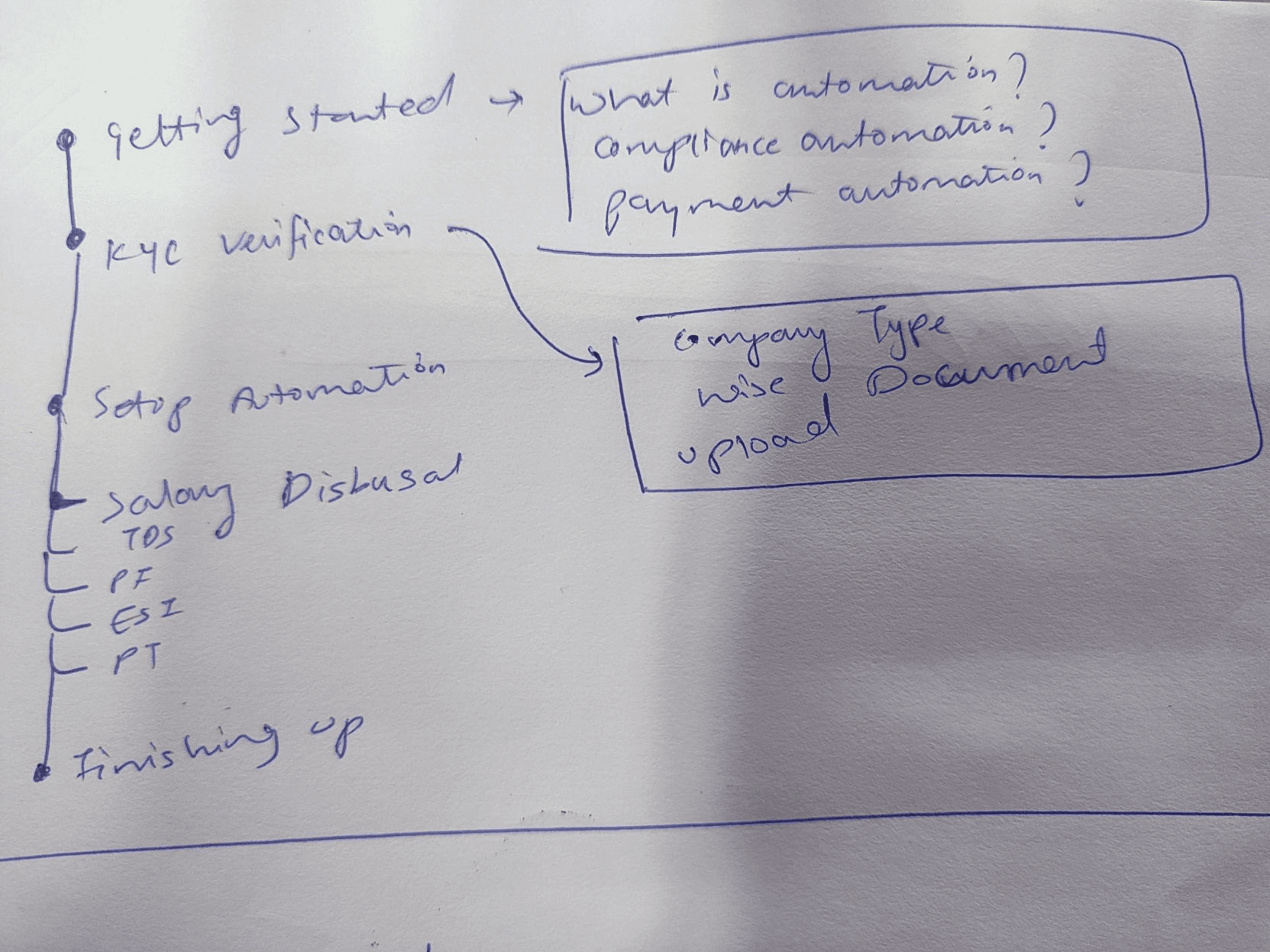
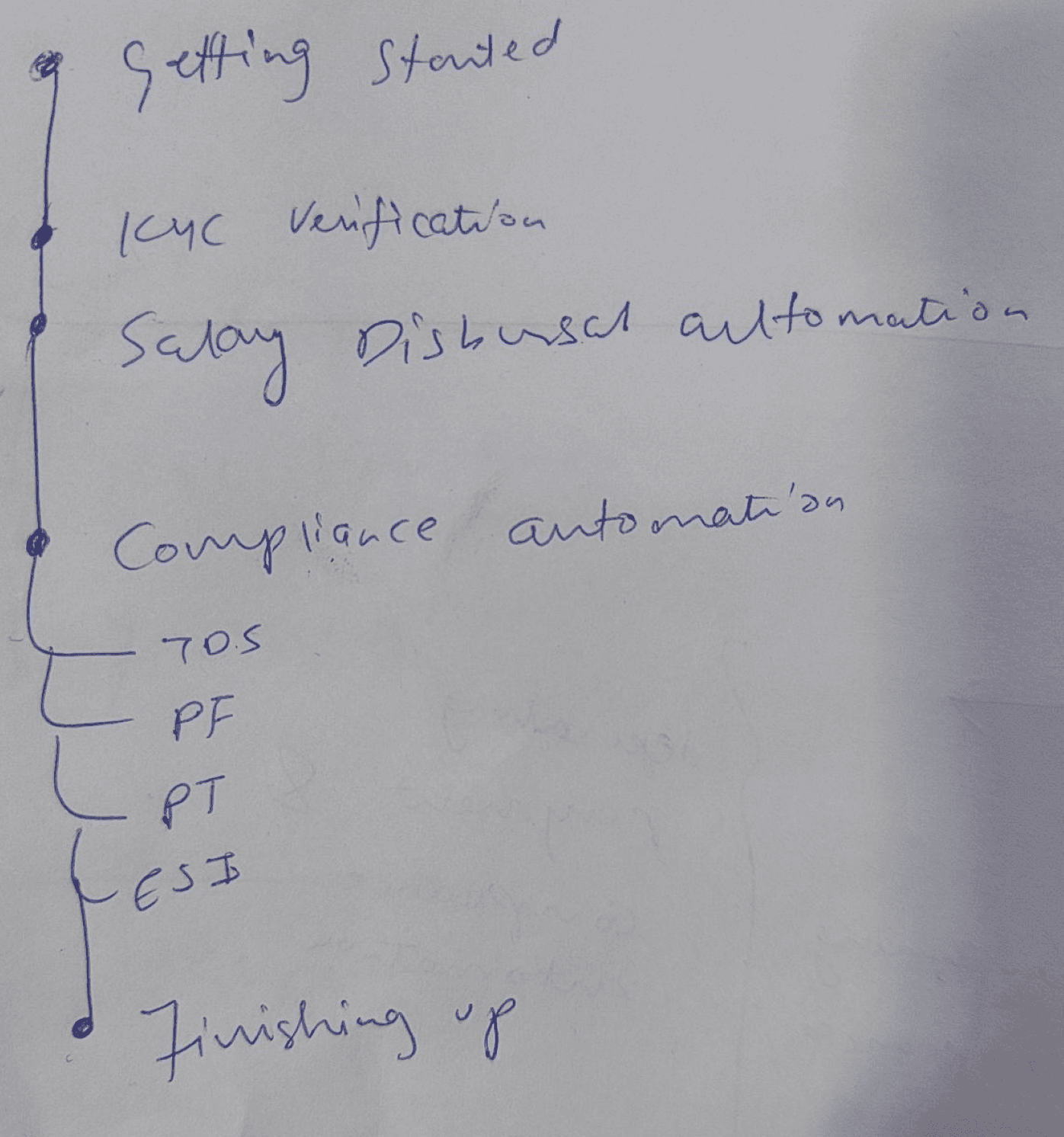
Iteration III
This is similar to the 2nd iteration. Only difference is that Salary Disbursal Automation and Compliance automation are separated.
We decided to go ahead with Iteration II
Reasons:
We wanted the user to perform KYC as mandatory step if they want to setup automation. If KYC verification step is after automation setup they might enable automation but might not perform KYC which is not ideal.
Combining automation under one section provides better context and makes the options clearer.
We were only providing compliance automation for single pay group tenants as of now. Therefore for multiple pay group clients we thought of showing ‘coming soon’ for Compliance automation.
For single pay group
Getting started
Finishing up
KYC Verification
Learn how automation works
Submit documents for verification
Automate payments & filings
Getting things ready
Setup automation
Salary disbursal
TDS
PF
ESI
PT
Getting started
Finishing up
KYC Verification
Learn how automation works
Submit documents for verification
Automate payments & filings
Getting things ready
Setup automation
Salary disbursal
TDS
PF
ESI
PT
For multiple pay group
Getting started
Finishing up
KYC Verification
Learn how automation works
Submit documents for verification
Automate payments & filings
Getting things ready
Setup automation
Salary disbursal
TDS
Coming soon
PF
Coming soon
ESI
Coming soon
PT
Coming soon
Designing wallet (Disbursal account)
Designing a wallet was an important part of this feature. Through this wallet user will
get to know what is the current balance, how much fund is required to make payments for the respective month or the transaction history.
I created multiple design iterations keeping in mind two things:
User should be able to easily locate the wallet on the screen
It should be distinguished from other UI element but should not dominate
Some of the iterations:
disbursal account balance
INR 50,000
disbursal account balance
INR 50,000
disbursal account balance
INR 50,000
disbursal account balance
INR 50,000
disbursal account balance
INR 50,000
disbursal account balance
INR 50,000
disbursal account balance
INR 50,000
disbursal account balance
INR 50,000
disbursal account balance
INR 50,000
We went with the simplest design with some gradient
to create distinction
Wallet states
Low account balance!
INR 30,000
Ideal
Balance low
Payment initiated (Approval chain)
disbursal account balance
INR 10,000
disbursal account balance
INR 50,000
Final Design
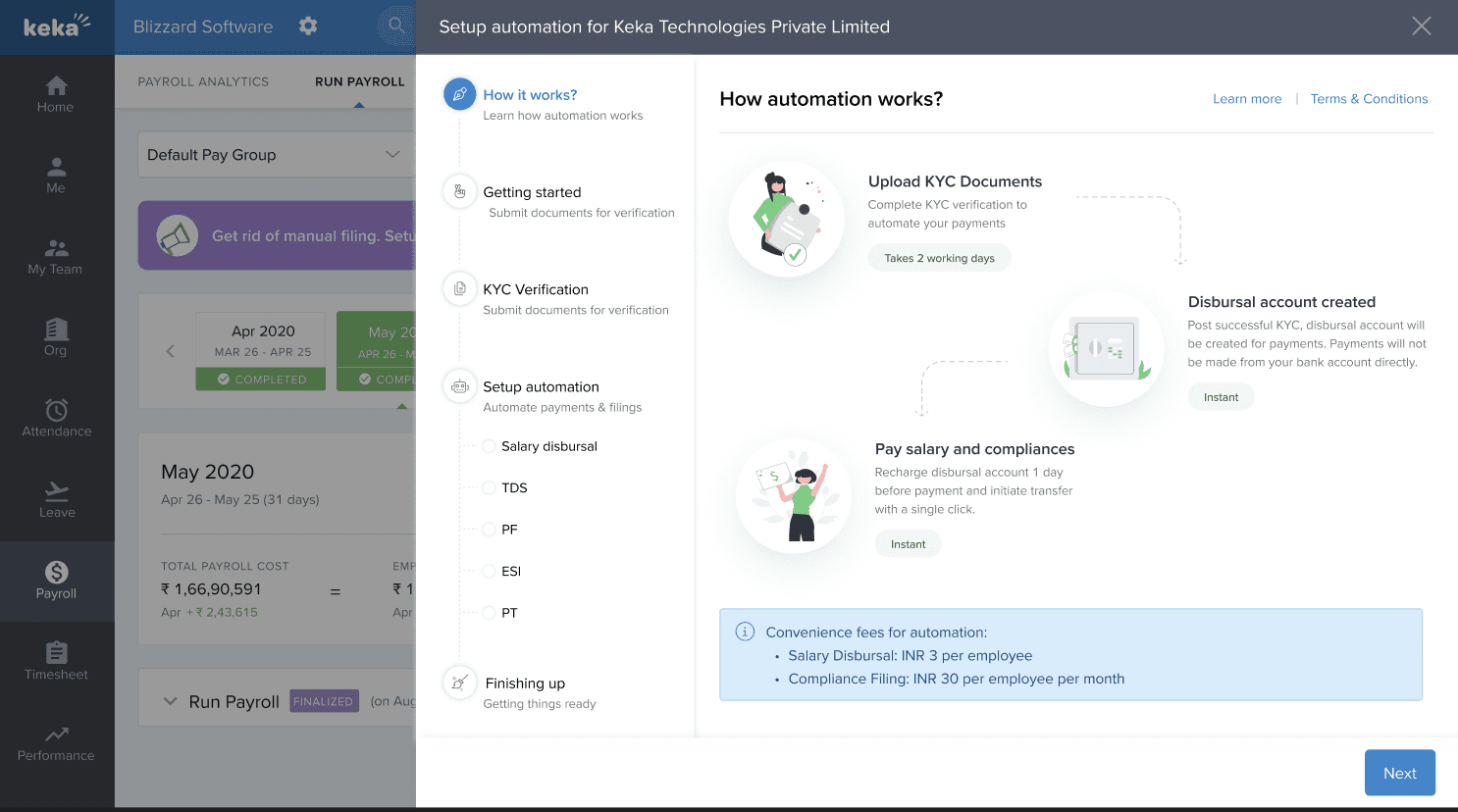
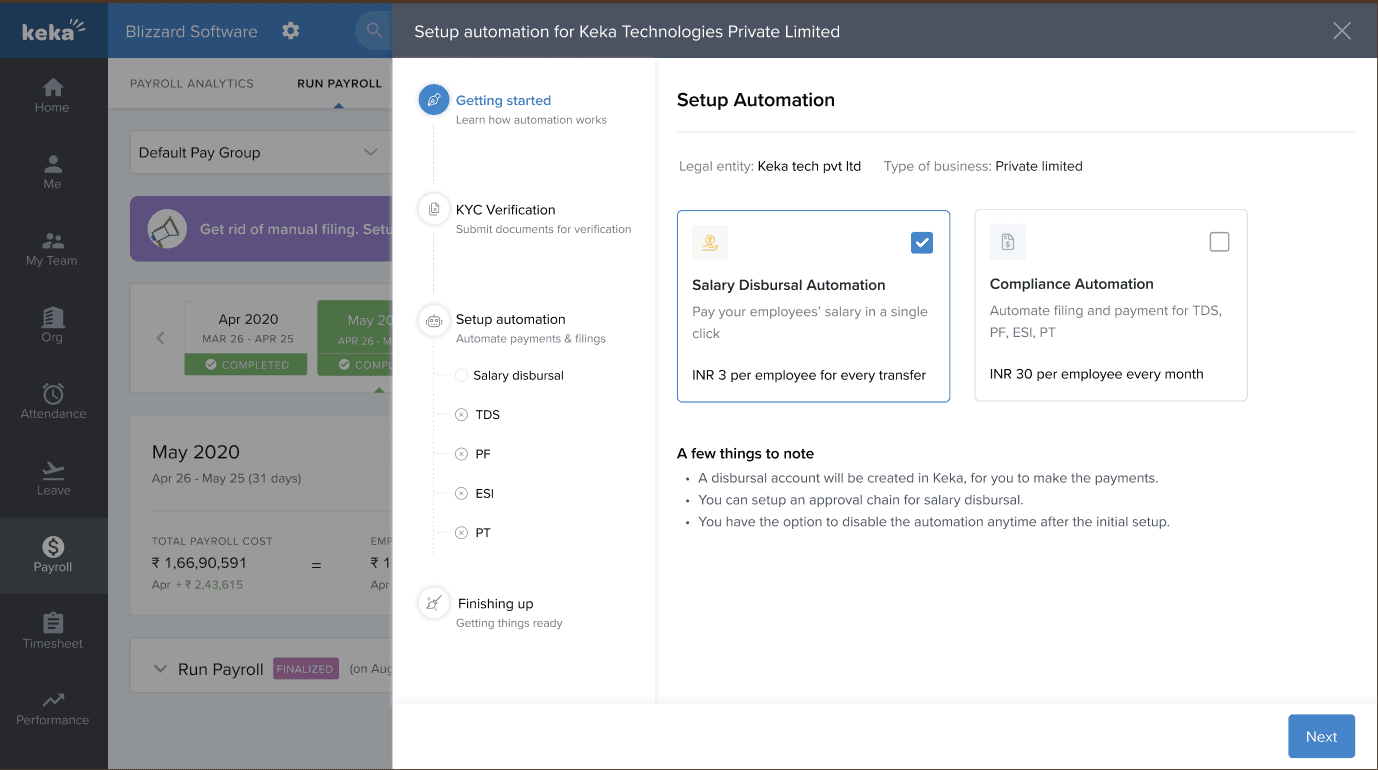
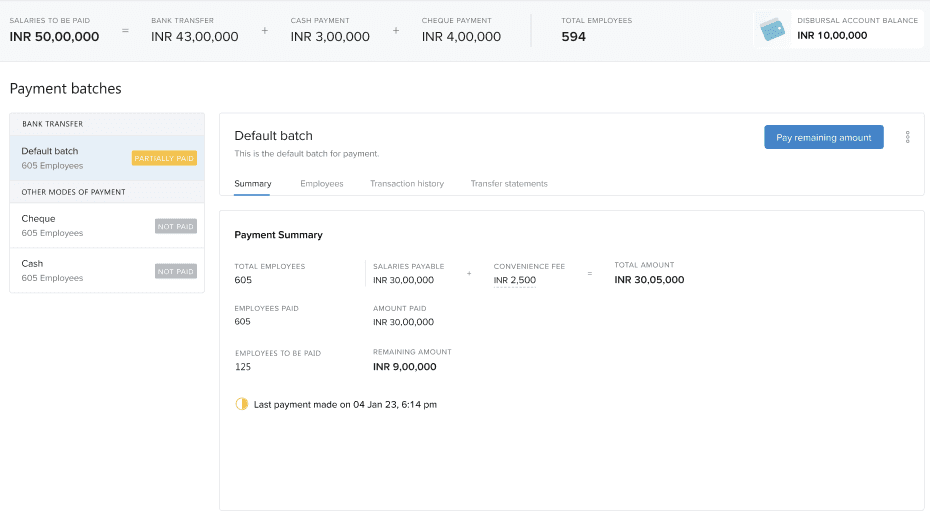
We made a number of important decisions on how to visualise and execute each step of the setup process and beyond that.
I'm unable to share the full design details here, but I'm open to discussing them in-depth with you. Feel free to reach out for a detailed conversation.
I am sharing some of the screen designs here for better understanding:
EVALUATIONS AND ITERATIONS
User testing and Beta release
We released this feature only for a bunch of clients who requested for this and were willing to use it as soon as possible. Since this feature required a lot of help from the finance team(keep note of transactions and compliance credentials) and customer support team(verifying KYC and resolving customer issues), success of this feature depended highly on them.
Some good words from our customers
This is much better than what is present in the market now.
The onboarding is very smooth and easy.
We have a lot of control on how and when we want to use funds.
Sweet feedback and questions
Can you tell us the pricing upfront. That will help me make a decision.
Not able to understand how the complete process of automation is going to work. Knowing the process should help.
How much time will each process time? By when can I start using the feature if I setup now?
Measuring success and metrics (Beta release)
Following the complete release, we'll have improved
metrics for measuring adoption.
88% success rate with beta release
Release automation for 9 early users, out of which 8 are using the feature now
100% of the users completed KYC verification
Most of the users found the process to be easy
Average time to setup is 4 hrs 23 min along with KYC verification
KYC verification is being done manually by the support team as of now
Feedback and Design iterations
Once we got the feedback from our Beta customers I started working on them to provide a better experience. Below are the iterations and design on how I worked upon the feedback.
Show pricing upfront
When we released the feature, in the first step we were already showing the pricing for payment and compliance automation upfront. We released that as there are many elements on the screen pricing is not taking users attention which is a major decision making factor while adopting this feature. Here is the minor card redesign.
Salary Disbursal Automation
Pay your employees’ salary in a single
click
INR 3 per employee for every transfer
Compliance Automation
Automate filing and payment for TDS,
PF, ESI, PT
INR 30 per employee every month
Highlighting the price
Salary Disbursal Automation
Pay your employees’ salary in a single
click
INR 3 per employee for every transfer
Compliance Automation
Automate filing and payment for TDS,
PF, ESI, PT
INR 30 per employee every month
Explaining the complete process
One straight forward way to explain the complete process was to include a video on the introductory screen. So this was one iteration I made.
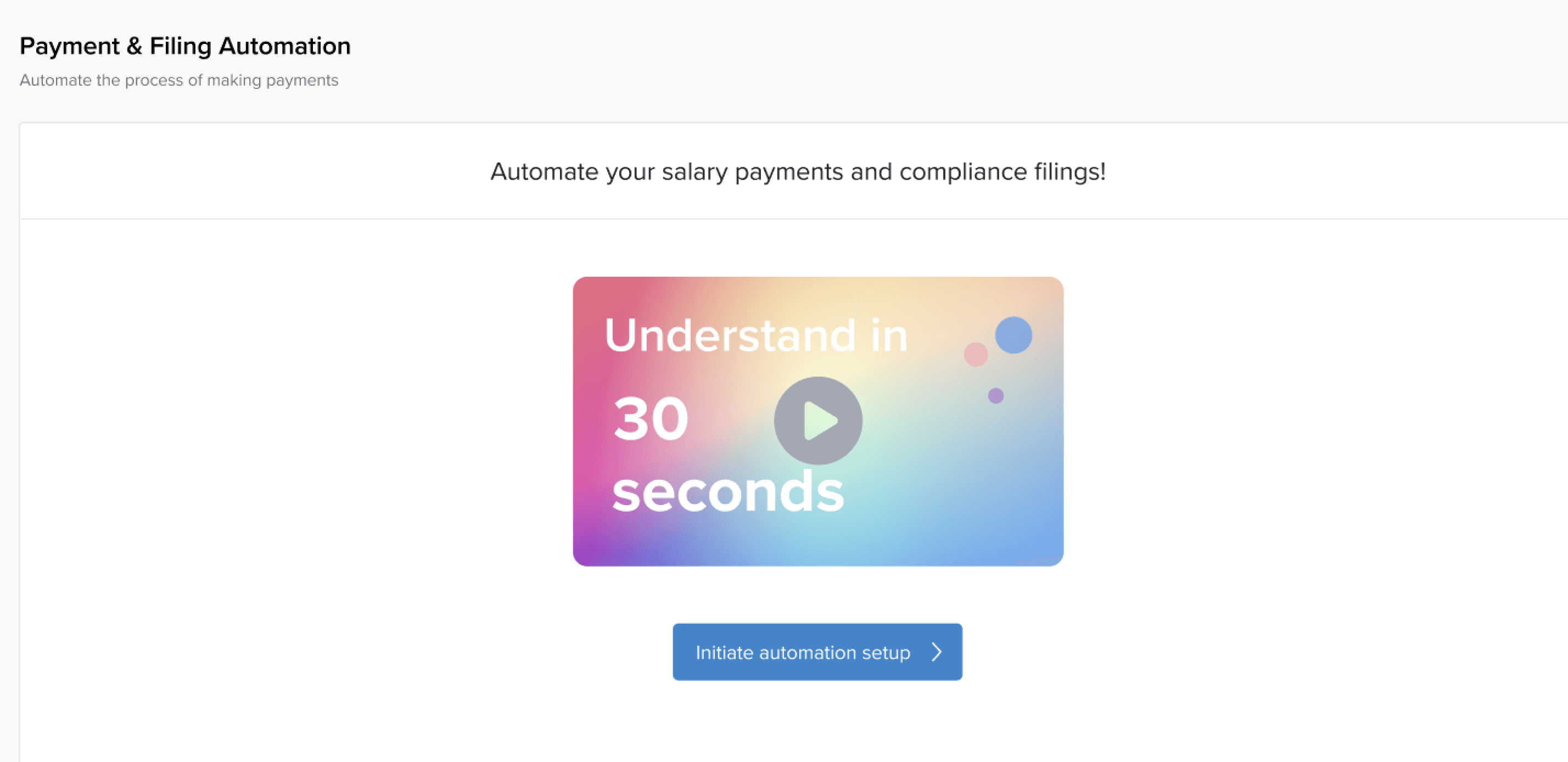
But there were two major problems with this approach:
Our user persona (i.e Finance admin/ HR admins/ CEO) usually don’t go through video but rather prefer easy to understand illustrations. I am not sure why but it may be due to time constraints. I thought of testing it but couldn’t due to the reason mentioned below.
When we discussed what kind of video we want with the marketing team they informed it might take some time which might have delayed the release of this feature
Now other way was to explain the process through illustrations. As I created iterations I discussed with my PM and other designers and incorporated their feedback.
View all iterations here
FUTURE STEPS
Automation for multiple pay group clients
In Keka users can create multiple pay groups for a single legal entity. Pay group is simply grouping employees whose payroll you want to execute together. We created automation for single pay group tenants only due to complexity in compliance. In future we aim to simplify the compliance architecture of the system and then expanding automation for multiple pay groups. This will help us get more customer using automation.
Connected banking as an option
Complete purpose of automation was to create an easy to use system to disburse employees salary. One of the ways my seniors had tried before was using connected banking but due to some unforeseen reasons they had to discontinue it. Although we have created automation(which users a third party to transfer funds), some customers had preferred connected banking. We might work on it based on the response and support we get from banks.
Using guides to help users along the way
To increase adoption and help users along the way we will be creating guides. We have explored Pendo (a product experience software) to create in-product guides and track adoption.
Rolling out automation to all the customers
We are planning to roll out this feature to all the customers once the feature marketing video is ready. I will be tracking the progress and adoption along the way.
Will update on the developments here :)